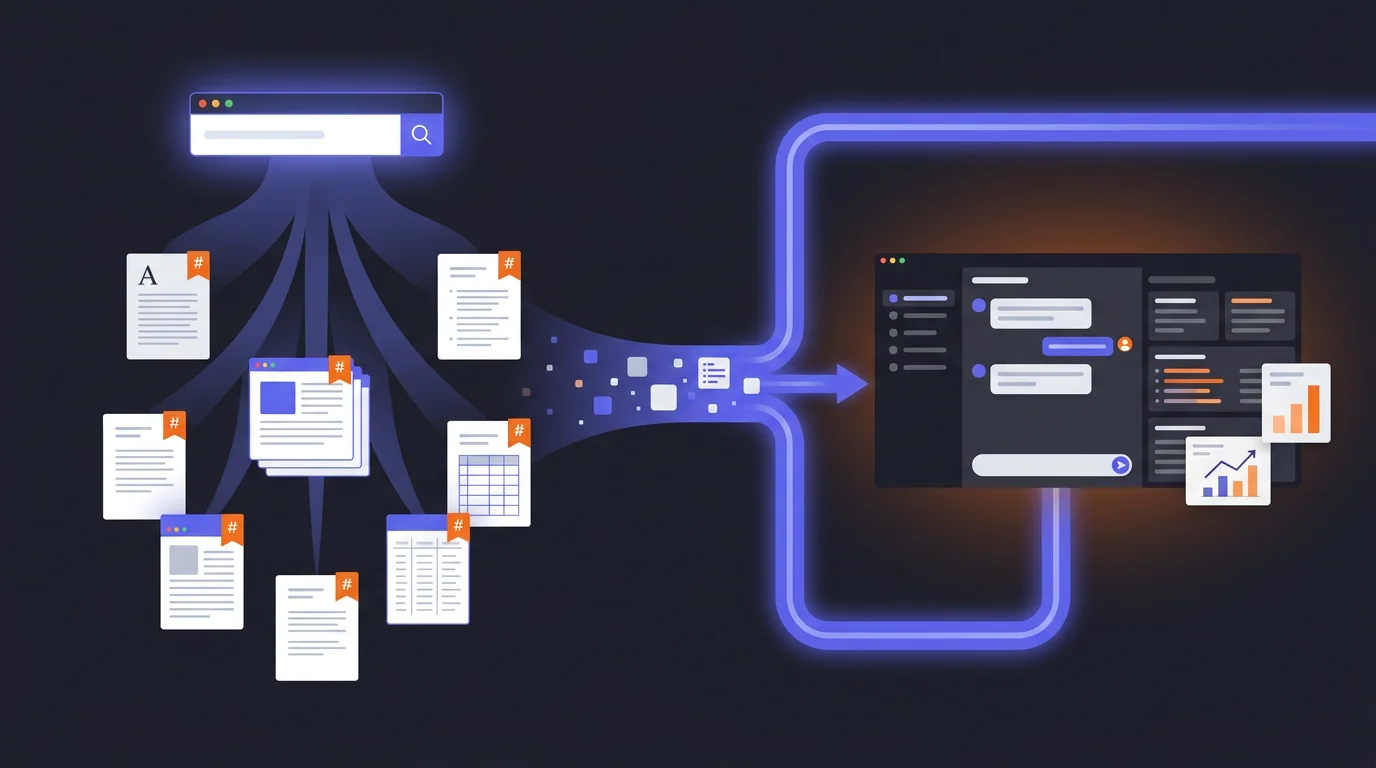
The Research Pipeline: How I Use Perplexity and Claude Together
Finding sourced facts and thinking about them are different jobs, and they blend badly in one conversation. The pipeline I built with Perplexity for the research and Claude for the analysis, and why most people can now run it with the research mode their assistant already has.
 Fabian Mösli
 Reading Preferences
Key Takeaways
- • Keep finding and thinking apart. Run the sourced, cited research as its own pass, in your assistant's research mode or a dedicated tool like Perplexity, then do the reasoning, analysis and writing in a fresh conversation, with the research file as its starting point.
- • Before the research runs, I ask Claude to write the research prompt for me — a brief with 10-15 specific questions that sends the research agents after every angle at once.
- • I export the research results as clean Markdown before handing them to Claude. Markdown has no invisible layout garbage, so it's the easiest format for an LLM to read and reason about.
In this guide
Most people do their research and their thinking in the same chat. They ask a question, take the answer, ask for an analysis of it, then for a draft, all in one long conversation. One chat window doing two jobs.
That’s like taking notes and forming an opinion in the same breath. Technically possible. Not ideal.
When I first wrote this guide, my answer was two tools: Perplexity for the research and Claude for everything that comes after, because each had a strength the other lacked. That has changed. The research modes built into the leading AI assistants have become so good that most people probably don’t need a separate research tool anymore. If you research for a living, in academia, journalism or market research, a dedicated one is still worth paying for. More on where I draw the line further down.
What hasn’t changed is the split. Finding sourced facts and thinking about them are different jobs, so read the steps below as two phases, whichever apps you run them in. I name Perplexity and Claude below because that’s where I built the pipeline. The same steps work with your assistant’s research mode and whatever chat assistant your company gives you.
Here’s the workflow.
Step 1: Craft your research prompt with Claude
This is the step most people skip — and it’s the one that makes the biggest difference.
When you have a research question, your instinct is to open a research tool and type it in. “What are the regulatory requirements for healthcare staffing in Switzerland?” Seems reasonable. But you’re leaving enormous value on the table, because you’re treating a research mode like a search engine. It’s not.
A serious research mode doesn’t just run one search. Given a good prompt, it runs many searches at once and reconciles what it finds. Perplexity Deep Research, for example, has its own thinking model under the hood and spawns dozens of parallel research agents, each attacking a different angle of your question at the same time. They search independently, compare findings, resolve contradictions, and pull everything into a single answer. It’s an entire research team working in parallel, and most people give that team a one-sentence brief.
So start in Claude and ask it to write the research prompt for you.
Here’s what I do:
“I need to research [topic]. Help me craft a comprehensive research prompt for [your research tool]. It will run many parallel research agents, so the prompt should include 10-15 specific questions that attack the topic from different angles. Include constraints on what sources to prioritize, what time period to focus on, what to exclude, and specify the desired output format.”
Claude will produce something like this (example for a healthcare staffing research task):
Research the regulatory landscape for temporary healthcare staffing platforms in Switzerland. Answer the following questions:
1. What are the current SECO guidelines for private employment agencies in healthcare? 2. Which cantonal licensing requirements exist, and how do they differ across German-speaking cantons? 3. What data protection certifications are mandatory for platforms handling healthcare worker personal data? 4. How has the regulatory environment changed since 2024? 5. What are the penalties for non-compliance? 6. Which recent enforcement actions have been taken against staffing platforms? 7. How do Swiss requirements compare to EU staffing regulations? 8. What industry associations set standards in this space? 9. Are there pending legislative proposals that would affect this market? 10. What compliance frameworks do established players like Adecco and Randstad use in Switzerland?
Prioritize official government sources, industry body publications, and legal analyses published after January 2025. Exclude generic blog posts and marketing content. Format as structured Markdown with clear section headings, bullet points for key requirements, and footnoted sources.
See the difference? Instead of one vague question, you’re handing the research tool a full research brief. Each of those questions becomes a separate thread its agents can pursue in parallel. The constraints filter out noise. The output format ensures you get something Claude can work with in the next step.
It takes two minutes to generate this prompt. The research that comes back is dramatically better.
Step 2: Run the research where the sources are
Now paste that prompt into a research mode: the one built into your assistant, or a dedicated tool like Perplexity Deep Research for the big jobs.
Why a research mode and not a normal chat? Because a research mode is built to go out and check. Every answer comes with cited sources. It searches the actual web, reads the actual pages, and synthesizes what it finds. When it tells me something, I can click through and verify. That matters when the information is going into a strategy document, a business plan, or a knowledge base that other people will rely on.
With your multi-angle research prompt, the research agents now have clear marching orders. Instead of deciding on their own what to research, they cover every angle you specified — regulatory requirements, enforcement history, comparison with EU frameworks, pending legislation, all at once.
If the first pass is still too shallow on any particular question, follow up:
“Go deeper on the data protection requirements. What certifications are mandatory for platforms handling healthcare worker data?”
This isn’t casual browsing. It’s targeted, sourced intelligence gathering.
The Markdown trick
The move that makes the whole pipeline work: export as Markdown.
Most people copy-paste research results into a document or just read them in the browser. Instead, export or copy the result as a Markdown file (.md). Markdown is plain text with lightweight structure tags — headings, bullet points, links — and no formatting garbage. No invisible Word styles, no PDF layout artifacts. Clean, parseable text.
LLMs read Markdown better than any other format. It’s their native language in a sense — almost all their training data was structured text, and Markdown is the most common way to structure text on the internet. Feeding an LLM a Markdown file versus a PDF is like giving a colleague a clean brief versus a photocopied fax.
Step 3: Build context in Claude
Now I take that Markdown file — my sourced, cited research — and upload it to a fresh conversation in Claude. But I don’t just start asking questions. I do something that feels counterintuitive: I ask Claude to write its own instructions.
Here’s the prompt:
“You are my senior strategy consultant for [domain]. I’ve uploaded a research document as your primary knowledge base. Before we start working: write a system prompt for yourself that ensures you always reference this research, never give generic answers, and cite specific findings from the document when making claims.”
Claude reads the research, understands the domain, and produces a set of instructions for itself — essentially a custom persona grounded in your specific data. It configures itself.
This is what I call meta-prompting: instead of you writing the perfect prompt, you let the AI write the prompt based on the context you gave it. It works because the AI understands its own capabilities and limitations better than most users do.
After Claude generates its self-instructions, I review them, tweak anything that’s off, and then we’re working from a foundation of real, sourced knowledge instead of the AI’s general training data.
Step 4: Work the problem
Now the actual work begins. And this is where Claude’s strengths kick in — long-form reasoning, structured analysis, and the ability to hold a complex conversation without losing the thread.
I might say:
“Based on the regulatory research, identify the three biggest compliance risks for a startup entering this market. For each risk, suggest a mitigation strategy.”
Claude draws from the uploaded research — the specific, sourced information the research pass gathered, not its generic training data. The answers come with references to the actual sources, because those sources are in the document it’s working from.
Then I push back:
“Your second risk seems overstated. In practice, most cantons don’t enforce that requirement for companies under 50 employees. Challenge your own reasoning — where might you be wrong?”
This is how I work with AI in general: not as a single query, but as an iterative conversation. Start broad, challenge the output, refine, push deeper. The AI gets better with each round because it’s building on a richer context.
Why this beats one long conversation
The obvious question: why not just ask in a normal chat and keep going?
Three reasons.
Sourcing. Left to answer from what it already “knows”, an AI will sometimes cite a study that doesn’t exist or quote a statistic with no real source. It isn’t lying; it has learned what a credible citation looks like and produces one that fits the shape. When I need current, verifiable facts, I need a pass that goes out and checks. The research gives me sources I can check. The analysis gives me reasoning I can build on. Different jobs.
Separation of concerns. Research and analysis are different cognitive tasks. Mixing them in one conversation leads to muddled results — the AI half-researches and half-analyses, doing neither well. Separating them forces clean handoffs.
Audit trail. The Markdown file is an artifact. If someone questions my analysis six months later, I can point to the research that informed it, complete with sources and dates. If I’d done everything in one conversation, that context would be scattered across a chat log.
Do you still need a separate research tool?
For most people, no. My rule of thumb is the size of the job. A quick web search with ten or twenty results to analyze, my normal AI tool handles fine. If I needed a list of potential clients in a new market with a drill-down on every one of them, I’d still go to a specialized tool. Part of the reason is usage limits: deep research burns through a lot, and running it inside the tool I use all day eats into the allowance I need for everything else. That bites less than it used to, but it’s still real. Right now I have no big research projects, so my own Perplexity subscription is on hold.
Inside my main tool, the split increasingly happens on its own: a planning model writes the brief, sends cheaper search agents after the questions, and reasons over what they bring back. And if your company’s AI tool has no research mode or can’t browse the web at all, the pipeline still works: gather with whatever research tool your company approves, or pull a few good sources together by hand, and bring them in as a file.
When the stakes are real, keep the gathering of sourced facts separate from the reasoning you build on top of it, whether that runs across two tools, two conversations, or two clearly marked phases in one tool. One pass finds. The next one thinks. Don’t make one conversation do both.
When this is overkill
Not everything needs a pipeline. If I’m writing a quick email, brainstorming ideas, or having a casual conversation about a topic I know well, I just open Claude and start talking. The pipeline is for when the stakes are high enough that you need sourced research as your foundation.
Good use cases:
- Market analysis for a new product or market entry
- Competitive intelligence briefings
- Regulatory research for compliance decisions
- Due diligence on potential partners or vendors
- Building a knowledge base for your company’s AI system
Not worth it for:
- Writing an email
- Quick brainstorming
- Anything where “roughly correct” is good enough
The bigger picture
This pipeline is actually the first step toward something more powerful. Once you have sourced research as Markdown files, you can start building a persistent knowledge base. Instead of one-off research that lives in a chat conversation and gets forgotten, you’re creating structured artifacts that accumulate over time.
That’s the foundation of what I call a Company AI Operating System — a system where AI doesn’t just answer from its training data, but from your company’s actual, verified knowledge. The research pipeline is where that knowledge comes from.
And once you have that foundation, the next move is even more interesting: instead of you asking the AI questions, you let the AI interview you — extracting the knowledge that’s in your head but has never been written down.
But that’s a story for another guide.
Published: 2026-03-17
Last updated: 2026-10-22